Unlike 3DSMax, Lightscape does not include modeling tools, which means you have to create your model in some other surface modeler such as AutoCAD, FormZ, Rhino, Maya, etc... You should know that Lightscape will process the surfaces in your model in a completely different manner, and this is a one-way-only process; which means for you, that you need to finish your modeling task before, and if you need to fix things in your model, you will have to re-do several steps.
Because Lightscape is a very delicate software in terms of precision, you will need to make several adjustments to your model before importing it into Lightscape to get a better performance.
File Format
Lightscape can read the following formats:
- *.3DS (3D Studio)
- *.DXF (AutoCAD)
- *.DWG (AutoCAD)
- *.LWS (Lightwave)
If you are working in AutoCAD, the best way is to use the native DWG format, because it preserves everything untouched. DXF, for instance, will skip your solid objects (only in AutoCAD), and 3DS will not read block information.
If you are working in a different modeling software, most likely you can export as DXF since it is a standard exchange file format. But if you cannot, you might need to go through a few other steps (such as exporting in a different format, reading it in AutoCAD or 3DSMax and exporting it again in one of those three formats).
Importing
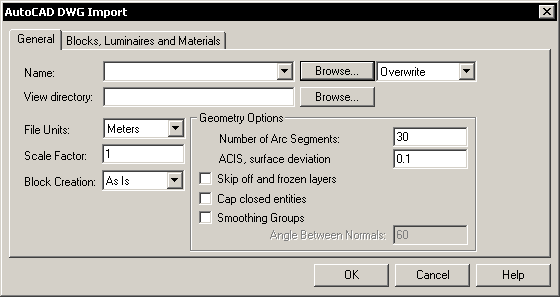
To import, select File>Import>... from the menu. A dialog box pops up.
- Browse for the file you want to import
- Select Overwrite or Append (you import in steps if you use append)
- Select the unit system you used for modeling, meaning what 1 unit represents in your drawing (i.e. 1 unit = 1 meter; or 1 unit = 1 foot, or 1 unit = 1 inch). This is very important because Lightscape will calculate light distribution based in this system.
- Select the accuracy of round entities (number of arc segments and surface deviation).
Since units are so important, a dialog box will ask you to confirm the size of the model.